Raspberry Pi
From Wikipedia, the free encyclopedia
(Redirected from
Raspberry pi)
"RPi" redirects here. For other uses, see
RPI.
Raspberry Pi
 |

Raspberry Pi computer Model B+
|
| Developer |
Raspberry Pi Foundation |
| Type |
Single-board computer |
| Release date |
February 2012 |
| Introductory price |
US$25 (model A) and US$35 (model B, B+) |
| Operating system |
Linux (Raspbian, Debian GNU/Linux, OpenELEC, Fedora, Arch Linux ARM, Gentoo), RISC OS, FreeBSD, NetBSD, Plan 9, Inferno, Openwrt |
| Power |
2.5 W (model A), 3.5 W (model B) 3.0 W (model B+) |
| CPU |
ARM1176JZF-S (ARMv6k) 700 MHz[1] |
| Memory |
256 MB[2] (Model A)
256 MB (Model B rev 1)
512 MB (Model B rev 2, B+)[3] |
| Storage |
SD card slot
SD or SDHC card (Model A and B), MicroSD card (Model B+) |
| Graphics |
Broadcom VideoCore IV[1] |
| Website |
www.raspberrypi.org |
The
Raspberry Pi is a credit card-sized
single-board computer developed in the
UK by the
Raspberry Pi Foundation with the intention of promoting the teaching of basic
computer science in schools.
[4][5][6]
The Raspberry Pi is manufactured in three board configurations through licensed manufacturing deals with
Newark element14 (
Premier Farnell),
RS Components and Egoman. These companies sell the Raspberry Pi online.
[7]
Egoman produces a version for distribution solely in China and Taiwan,
which can be distinguished from other Pis by their red coloring and lack
of FCC/CE marks. The hardware is the same across all manufacturers.
In 2014 the Raspberry Pi Foundation launched the Compute Module,
which packaged a Raspberry Pi Model B into a SODIMM 200-pin module. This
was to encourage its use in embedded systems.
[8]
The Raspberry Pi has a
Broadcom BCM2835
system on a chip (SoC),
[1] which includes an
ARM1176JZF-S 700
MHz processor,
VideoCore IV GPU,
[9] and was originally shipped with 256 megabytes of
RAM, later upgraded (Model B & Model B+) to 512
MB.
[2][10] It does not include a built-in
hard disk or
solid-state drive, but it uses an
SD card for booting and persistent storage, with the Model B+ using a MicroSD.
[11]
The Foundation provides Debian and Arch Linux ARM
distributions for download.
[12] Tools are available for
Python as the main programming language, with support for
BBC BASIC[13] (via the
RISC OS image or the Brandy Basic clone for Linux),
[14] C,
C++,
Java,
[15] Perl and
Ruby.
[16]
As of February 2014, about 2.5 million boards had been sold.
[17]
Hardware

Location on the PCB of connectors and major ICs of original Raspberry PI B
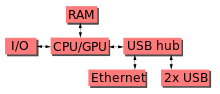
Block diagram of the Model-A, B and B+; in a Model-A the lowest two
blocks and the rightmost block are missing (note that these three blocks
are in a chip that actually contains a three-port USB hub, with a USB
Ethernet adapter connected to one of its ports). In the Model-A the USB
port is connected directly to the SoC. On the model B+ the chip contains
a five point hub, with four USB ports fed out, instead of the two of
the B.
Processor
Level 2
cache is
128 KB, used primarily by the GPU, not the CPU.
The
Broadcom SoC used in the Raspberry Pi is equivalent to a chip used in an old
smartphone
(Android or iPhone). While operating at 700 MHz by default, the
Raspberry Pi provides a real world performance roughly equivalent to the
0.041
GFLOPS.
[18][19] On the
CPU level the performance is similar to a 300 MHz
Pentium II of 1997-1999. The
GPU provides 1
Gpixel/s or 1.5
Gtexel/s
of graphics processing or 24 GFLOPS of general purpose computing
performance. The graphics capabilities of the Raspberry Pi are roughly
equivalent to the level of performance of the
Xbox
of 2001. The Raspberry Pi chip, operating at 700 MHz by default, will
not become hot enough to need a heatsink or special cooling. The SoC is
stacked underneath the RAM chip, so only its edge is visible.
The
LINPACK single node compute benchmark results in a mean
single precision performance of 0.065 GFLOPS and a mean
double precision performance of 0.041 GFLOPS for one Raspberry Pi Model-B board.
[20] A cluster of 64 Raspberry Pi Model-B computers, labeled "Iridis-pi", achieved a LINPACK
HPL suite result of 1.14 GFLOPS (n=10240) at 216
watts for c. US$4,000.
[20]
Overclocking
Most Raspberry Pi devices can be overclocked to 800 MHz and some even higher to 1000 MHz. In the
Raspbian Linux distro the overclocking options on
boot
can be done by a software command running "sudo raspi-config" without
voiding the warranty, see note 9 below. In those cases the PI
automatically shuttles the over clocking down in case the chip reaches
85 °C (185 °F), but it is possible to overrule automatic over voltage
and over clocking settings (voiding the warranty). In that case one can
try putting an appropriately sized heatsink on it to keep the chip from
heating up far above 85 °C.
Newer versions of the firmware contain the option to choose between
five overclock ("turbo") presets that when turned on try to get the most
performance out of the SoC without impairing the lifetime of the Pi.
This is done by monitoring the core temperature of the chip, and the CPU
load, and dynamically adjusting clock speeds and the core voltage. When
the demand is low on the CPU, or it is running too hot, the performance
is throttled, but if the CPU has much to do, and the chip's temperature
is acceptable, performance is temporarily increased, with clock speeds
of up to 1 GHz, depending on the individual board, and on which of the
turbo settings is used. The five settings are:
- None; 700 MHz ARM, 250 MHz core, 400 MHz SDRAM, 0 overvolt,
- Modest; 800 MHz ARM, 250 MHz core, 400 MHz SDRAM, 0 overvolt,
- Medium; 900 MHz ARM, 250 MHz core, 450 MHz SDRAM, 2 overvolt,
- High; 950 MHz ARM, 250 MHz core, 450 MHz SDRAM, 6 overvolt,
- Turbo; 1000 MHz ARM, 500 MHz core, 600 MHz SDRAM, 6 overvolt.[21][22]
In the highest (
turbo) preset the SDRAM clock was originally
500 MHz, but this was later changed to 600 MHz because 500 MHz sometimes
causes SD card corruption. Simultaneously in
high mode the core clock speed was lowered from 450 to 250 MHz, and in
medium mode from 333 to 250 MHz.
RAM
On the older beta model B boards, 128 MB was allocated by default to the GPU, leaving 128 MB for the CPU.
[23]
On the first 256 MB release model B (and Model A), three different
splits were possible. The default split was 192 MB (CPU RAM), which
should be sufficient for standalone 1080p video decoding, or for simple
3D, but probably not for both together. 224 MB was for Linux only, with
just a 1080p
framebuffer, and was likely to fail for any video or 3D. 128 MB was for heavy 3D, possibly also with video decoding (e.g. XBMC).
[24] Comparatively the Nokia 701 uses 128 MB for the Broadcom VideoCore IV.
[25]
For the new model B with 512 MB RAM initially there were new standard
memory split files released( arm256_start.elf, arm384_start.elf,
arm496_start.elf) for 256 MB, 384 MB and 496 MB CPU RAM (and 256 MB,
128 MB and 16 MB video RAM). But a week or so later the RPF released a
new version of start.elf that could read a new entry in config.txt
(gpu_mem=xx) and could dynamically assign an amount of RAM (from 16 to
256 MB in 8 MB steps) to the GPU, so the older method of memory splits
became obsolete, and a single start.elf worked the same for 256 and
512 MB Pis.
[26]
Networking
Though the Model A does not have an
8P8C ("RJ45") Ethernet port, it can connect to a network by using an external user-supplied USB Ethernet or
Wi-Fi adapter. On the
model B the Ethernet port is provided by a built-in USB Ethernet adapter.
Peripherals
Generic USB
keyboards and
mice are compatible with the Raspberry Pi.
[11]
Video
The video controller is capable of the following video resolutions: 640 × 350
EGA; 640 × 480
VGA; 800 × 600
SVGA; 1024 × 768
XGA; 1280×720
720p HDTV; 1280 × 768
WXGA Variant; 1280 × 800
WXGA Variant; 1280 × 1024
SXGA; 1366 × 768
WXGA Variant; 1400 × 1050
SXGA+; 1600 × 1200
UXGA; 1680 × 1050
WXGA+; 1920 × 1080
1080p HDTV; 1920 × 1200
WUXGA.
[27] It can also generate
576i and
480i composite video signals for
PAL-BGHID,
PAL-M,
PAL-N,
NTSC and
NTSC-J.
[28]
Real-time Clock
The Raspberry Pi does not come with a
real-time clock, which means it cannot keep track of the time of day while it is not running.
As alternatives, a program running on the Pi can get the time from a
network time server or user input at boot time.
A real-time clock (such as the DS1307) with battery backup can be added via the
I²C interface.
Specifications
|
Model A |
Model B |
Model B+ |
Compute Module
Note: all interfaces are via 200-pin DDR2 SO-DIMM connector. |
| Target price: |
US$25 |
US$35[29][30] |
US$30 (in batches of 100)[31] |
| SoC: |
Broadcom BCM2835 (CPU, GPU, DSP, SDRAM, and single USB port)[1][31] |
| CPU: |
700 MHz ARM1176JZF-S core (ARM11 family, ARMv6 instruction set)[1] |
| GPU: |
Broadcom VideoCore IV @ 250 MHz[32][33]
OpenGL ES 2.0 (24 GFLOPS)
MPEG-2 and VC-1 (with license[34]), 1080p30 h.264/MPEG-4 AVC high-profile decoder and encoder[1] |
| Memory (SDRAM): |
256 MB (shared with GPU) |
512 MB (shared with GPU) as of 15 October 2012 |
| USB 2.0 ports:[11] |
1 (direct from BCM2835 chip) |
2 (via the on-board 3-port USB hub)[35] |
4 (via the on-board 5-port USB hub)[29][36] |
1 (direct from BCM2835 chip) |
| Video input: |
15-pin MIPI camera interface (CSI) connector, used with the Raspberry Pi Camera or Raspberry Pi NoIR Camera.[37] |
2× MIPI camera interface (CSI)[31][38][39] |
| Video outputs: |
Composite video (PAL and NTSC) (in Models A and B, via RCA jack; in Model B+, via 3.5 mm TRRS jack shared with audio out), HDMI (rev 1.3 & 1.4),[40] MIPI display interface (DSI) for raw LCD panels[41][42]
14 HDMI resolutions from 640×350 to 1920×1200 plus various PAL and NTSC standards.[27] |
Composite video,[38] HDMI, 2× MIPI display interface (DSI)[31][39] |
| Audio outputs: |
analog audio via 3.5 mm phone jack, HDMI, and, as of revision 2 boards, I²S audio[44] (also potentially for audio input) |
analog audio, HDMI, I²S |
| Onboard storage:[11] |
SD / MMC / SDIO card slot (3.3 V with card power only) |
MicroSD[29] |
4-GB eMMC flash memory chip;[31] may or may not support external SD cards with configuration changes |
| Onboard network:[11] |
None |
10/100 Mbit/s Ethernet (8P8C) USB adapter on the third/fifth port of the USB hub[35] |
None |
| Low-level peripherals: |
8× GPIO,[45] plus the following, which can also be used as GPIO: UART, I²C bus, SPI bus with two chip selects, I²S audio[46] +3.3 V, +5 V, ground[32][47] |
17× GPIO plus the same specific functions, and HAT ID bus |
46× GPIO, some of which can be used for specific functions including I²C, SPI, UART, PCM, PWM |
| Power ratings: |
300 mA (1.5 W)[49] |
700 mA (3.5 W) |
600 mA (3.0 W)[29] |
similar to Model A |
| Power source: |
5 V via MicroUSB or GPIO header |
5 V |
| Size: |
85.60 mm × 56 mm (3.370 in × 2.205 in) – not including protruding connectors |
67.6 mm × 30 mm (2.66 in × 1.18 in) |
| Weight: |
45 g (1.6 oz) |
7 g (0.25 oz) |
Accessories
- Camera – On 14 May 2013, the foundation and the distributors RS
Components & Premier Farnell/Element 14 launched the Raspberry Pi
camera board with a firmware update to accommodate it.[51] The camera board is shipped with a flexible flat cable that plugs into the CSI
connector located between the Ethernet and HDMI ports. In Raspbian, one
enables the system to use the camera board by the installing or
upgrading to the latest version of the OS and then running Raspi-config
and selecting the camera option. The cost of the camera module is 20 EUR in Europe (9 September 2013).[52] It can produce 1080p, 720p, 640x480p video. The footprint dimensions are 25 mm x 20 mm x 9 mm.[52]
- Gertboard – A Raspberry Pi Foundation sanctioned device designed for
educational purposes, and expands the Raspberry Pi's GPIO pins to allow
interface with and control of LEDs, switches, analog signals, sensors
and other devices. It also includes an optional Arduino compatible controller to interface with the Pi.[53]
- Infrared Camera – in October 2013, the foundation announced that
they would begin producing a camera module without an infrared filter,
called the Pi NoIR.[54]
- HAT (Hardware Attached on Top) expansion boards – Together with the model B+, inspired by the Arduino shield boards, were devised by the Raspberry PI Foundation. Each HAT board carries a small EEPROM (typically a CAT24C32WI-GT3)[55] containing the relevant details of the board,[56] so that the Raspberry PI's OS is informed of the HAT, and the technical details of it, relevant to the OS using the HAT.[57] Mechanical details of a HAT board, that use the four mounting holes in their rectangular formation, are here: [1]. More info here: [2].
Software
Operating systems
The Raspberry Pi primarily uses
Linux kernel-based
operating systems (it is not possible to run Windows on the Raspberry Pi).
[58] The
ARM11 is based on version 6 of the
ARM on which several popular versions of Linux no longer run (in current releases), including
Ubuntu.
[59] The install manager for Raspberry Pi is NOOBS. The OSs included with NOOBS are:
- Other OSs
Driver APIs
Raspberry Pi can use a
VideoCore IV
GPU via a
binary blob, which is loaded into the GPU at boot time from the
SD-card, and additional software, that initially was
closed source.
[88] This part of the driver code was later released,
[89]
however much of the actual driver work is done using the closed source
GPU code. Application software uses calls to closed source run-time
libraries (
OpenMax,
OpenGL ES or
OpenVG)
which in turn calls an open source driver inside the Linux kernel,
which then calls the closed source Videocore IV GPU driver code. The
API of the kernel driver is specific for these closed libraries. Video applications use
OpenMAX,
3D applications use
OpenGL ES and
2D applications use
OpenVG which both in turn use
EGL. OpenMAX and EGL use the open source kernel driver in turn.
[90]
Third party application software
- Mathematica – Since 21 November 2013, Raspbian includes a full installation of this proprietary software for free.[91][92] As of 1 August 2014 the version is Mathematica 10.[93]
- Minecraft – Released 11 February 2013; a version for the Raspberry Pi, in which you can modify the game world with code.[94]
Reception and use
Technology writer
Glyn Moody described the project in May 2011 as a "potential
BBC Micro 2.0", not by replacing
PC compatible machines but by supplementing them.
[95] In March 2012 Stephen Pritchard echoed the BBC Micro successor sentiment in
ITPRO.
[96]
Alex Hope, co-author of the Next Gen report, is hopeful that the
computer will engage children with the excitement of programming.
[97] Co-author
Ian Livingstone suggested that the
BBC could be involved in building support for the device, possibly branding it as the BBC Nano.
[66] Chris Williams, writing in
The Register sees the inclusion of programming languages such as Kids Ruby,
Scratch and
BASIC
as a "good start" to equip kids with the skills needed in the future –
although it remains to be seen how effective their use will be.
[98] The Centre for Computing History strongly supports the Raspberry Pi project, feeling that it could "usher in a new era".
[99] Before release, the board was showcased by
ARM's CEO
Warren East at an event in Cambridge outlining
Google's ideas to improve UK science and technology education.
[100]
Harry Fairhead, however, suggests that more emphasis should be put on
improving the educational software available on existing hardware,
using tools such as
Google App Inventor to return programming to schools, rather than adding new hardware choices.
[101] Simon Rockman, writing in a
ZDNet blog, was of the opinion that teens will have "better things to do", despite what happened in the 1980s.
[102]
In October 2012, the Raspberry Pi won T3's Innovation of the Year award,
[103] and futurist
Mark Pesce cited a (borrowed) Raspberry Pi as the inspiration for his
ambient device project MooresCloud.
[104] In October 2012, the
British Computer Society
reacted to the announcement of enhanced specifications by stating,
"it's definitely something we'll want to sink our teeth into."
[105]
The Raspberry Pi community was described by Jamie Ayre of
FLOSS software company
AdaCore as one of the most exciting parts of the project.
Community blogger Russell Davis said that the community strength allows
the Foundation to concentrate on documentation and teaching. The community is developing
fanzines around the platform, such as
The MagPi.
[107] A series of community
Raspberry Jam events have been held across the UK
[108] and further afield,
[109] led by Alan O'Donohoe,
[108][110][111] principal teacher of ICT at
Our Lady's High School, Preston,
[111][112] and a teacher-led community from RaspberryJam has started building a
crowdsourced scheme of work.
[113]
Use in education
As of January 2012, enquiries about the board in the United Kingdom have been received from schools in both the
state and
private
sectors, with around five times as much interest from the latter. It is
hoped that businesses will sponsor purchases for less advantaged
schools.
[114] The CEO of Premier Farnell said that the government of a country in the
Middle East has expressed interest in providing a board to every schoolgirl, in order to enhance her employment prospects.
[115][116]
The Raspberry Pi Foundation and
Oxford, Cambridge and RSA Examinations
launched a beta of the Cambridge GCSE Computing Online course or MOOC
(Massive Open Online Course) based around the current GCSE Computing
syllabus. The MOOC will consist of videos, animations and interactive
tasks on every part of the curriculum presented by UK teachers. The beta
is currently presented by Clive Beale who is the Head of Educational
Development. All tasks will be supported by written materials and audio
and text transcripts available for disabled students. The first MOOC
will be linked to a formal GCSE qualification.
[117]
Oxford, Cambridge and RSA Examinations
also provide resources to use with a Raspberry Pi for teachers who
would like to use the device in their lessons including Getting started,
Singing Jelly Baby and other features about the Raspberry Pi.
[118]
History

An early alpha-test board in operation using different layout from later beta and production boards
In 2006, early concepts of the Raspberry Pi were based on the
Atmel ATmega644 microcontroller. Its schematics and
PCB layout are publicly available.
[119] Foundation
trustee Eben Upton assembled a group of teachers, academics and computer enthusiasts to devise a computer to inspire children.
[114] The computer is inspired by Acorn's
BBC Micro of 1981.
[120][121] Model A, Model B and Model B+ are references to the original models of the British educational
BBC Micro computer, developed by
Acorn Computers.
[98] The first ARM prototype version of the computer was mounted in a package the same size as a
USB memory stick.
[122] It had a USB port on one end and an
HDMI port on the other.
The Foundation's goal was to offer two versions, priced at US$25 and
US$35. They started accepting orders for the higher priced model B on 29
February 2012,
[123] and the lower cost model A on 4 February 2013.
[124]
Pre-launch
- July 2011 – Trustee Eben Upton publicly approached the RISC OS Open community in July 2011 to enquire about assistance with a port.[125] Adrian Lees at Broadcom has since worked on the port,[126][127] with his work being cited in a discussion regarding the graphics drivers.[128] This port is now included in NOOBS.
- August 2011 – 50 alpha boards are manufactured. These boards were functionally identical to the planned model B,[129] but they were physically larger to accommodate debug headers. Demonstrations of the board showed it running the LXDE desktop on Debian, Quake 3 at 1080p,[130] and Full HD MPEG-4 video over HDMI.[131]
- October 2011 – A version of RISC OS 5 was demonstrated in public, and following a year of development the port was released for general consumption in November 2012.[63][132][133][134]
- December 2011 – Twenty-five model B Beta boards were assembled and tested[135] from one hundred unpopulated PCBs.[136]
The component layout of the Beta boards was the same as on production
boards. A single error was discovered in the board design where some
pins on the CPU were not held high; it was fixed for the first
production run.[137] The Beta boards were demonstrated booting Linux, playing a 1080p movie trailer and the Rightware Samurai OpenGL ES benchmark.[138]
- Early 2012 – During the first week of the year, the first 10 boards were put up for auction on eBay.[139][140] One was bought anonymously and donated to the museum at The Centre for Computing History in Suffolk, England.[99][141] The ten boards (with a total retail price of £220) together raised over £16,000,[142] with the last to be auctioned, serial number No. 01, raising £3,500.[143]
In advance of the anticipated launch at the end of February 2012, the
Foundation's servers struggled to cope with the load placed by watchers
repeatedly refreshing their browsers.[144]
Launch
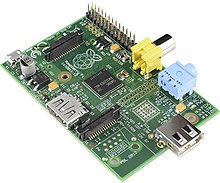
Raspberry Pi Model A
19 February 2012 – The first proof of concept SD card image that
could be loaded onto an SD card to produce a preliminary operating
system is released. The image


